QR inspections vs group chat reports
Group chats are quick and everyone already has one, but reports scroll away, are hard to find later, and nobody is told when a check was missed. A QR inspection app saves each check against the thing that was checked, with the name, the time and photos, shows what was missed and keeps problems open until they are fixed.
Here is how they compare.
At a glance
| Group chat | QR inspection app | |
|---|---|---|
| Getting started | Usually already in use | Labels, a short checklist and phones |
| What gets reported | Whatever someone types | The same questions every time |
| Who did it, and when | The sender and the time of the message | Saved with the signed-in name and the time |
| Photos | Mixed in with every other message | Attached to the record |
| Missed checks | Noticed if someone counts the messages | Shown against the schedule |
| Problems | Depend on someone replying and remembering | Stay open until confirmed fixed |
| Finding old records | Scrolling back through months of messages | A search by item, person or date |
| Monthly reports | Someone retypes the messages | Records export to a file |
| Several sites | One chat per site, or more | All sites in one place |
Why teams report in group chat
It makes sense at first. Nobody needs training, a photo takes seconds, and everyone on the team sees it. For a quick question or an urgent "can someone come and look at this?", a chat is hard to beat.
Where group chat falls short
The trouble starts when messages have to work as records:
- Reports get buried. Inspection photos sit between shift swaps and lunch plans, and a week later they are hard to find.
- Silence looks the same either way. If no message arrives, you can't tell whether the check was missed or the person just didn't report it.
- Everyone reports differently. One person writes "OK", another sends a photo with no words, and neither says which pump it was.
- Problems get lost. When everyone has read a message, each person can assume someone else is dealing with it.
- Totals mean retyping. A monthly report means someone goes back through the chat and copies it into a spreadsheet.
- Records can leave with people. When someone changes phones or leaves the team, what they saw may go with them.
When a QR inspection app helps most
An app pays off when:
- You may need to show what was checked, when and by whom.
- Several people or shifts do the checks, or you have more than one site.
- You want to know about a missed check the same day.
- Problems get forgotten between the person who finds them and the person who fixes them.
- Someone spends hours turning messages into reports.
Can you keep both?
Yes, and most teams do. Keep the chat for conversation and move the record to the app. One simple rule works well: if it needs to be on record, it goes through the QR code.
How to move checks out of group chat
- Pick the check people report most often in the chat.
- Turn what they usually write into a short checklist. See What to include in an inspection checklist.
- Put a QR label on each thing that gets checked.
- Tell the team that a check counts once it has been scanned, and that photos go in the form.
- Run it at one site for two to four weeks, then move on to the next check.
Where MintCheck fits
MintCheck is a QR inspection service for teams that have outgrown reporting in chat. Workers scan with the MintCheck app, answer the items and mark the result Normal or Abnormal, with photos. An Abnormal result stays Unresolved until it is fixed, and the site dashboard shows completed inspections against the planned number.
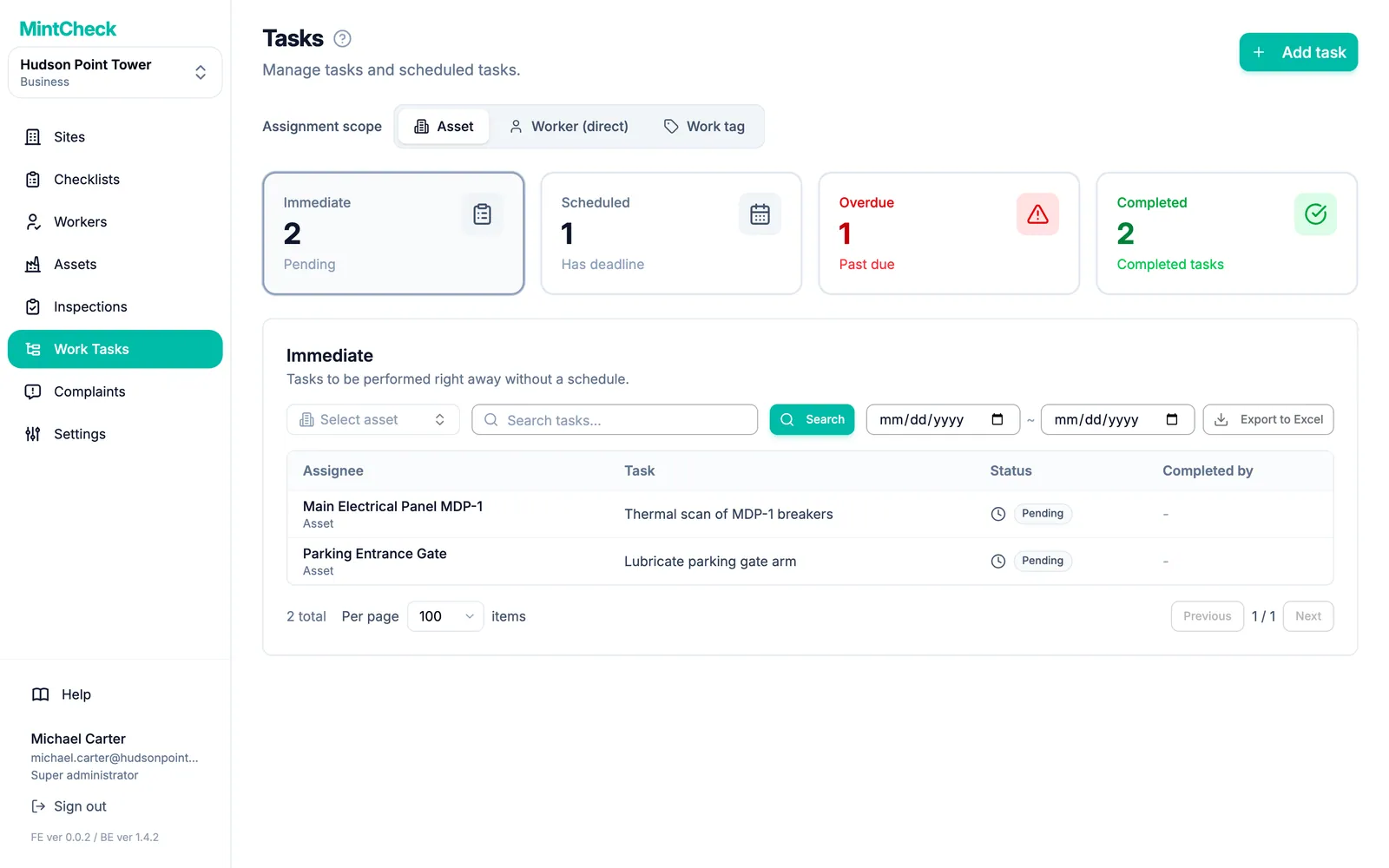
One-off jobs go in as work tasks instead of messages, with a due date if you need one. Workers using the app get a notification when a task is assigned to them, and they complete it with a note and photos.
Visitors have their own route: they scan a complaint QR code and report a problem with no account or app. Inspection records and work tasks can be exported to Excel.
MintCheck is free for up to 5 assets with no credit card, and there is no per-user pricing. You can walk through the real screens in the interactive demo, or compare plans and pricing.
Common questions
Is a group chat good enough for inspection records?
It works for quick messages, but it is hard to search, total or check later. Whether chat messages are accepted as records depends on the rules that apply to your building and on the authority that checks them, so ask them.
Can we keep using group chat with an inspection app?
Yes. Keep the chat for conversation and use the app for anything that needs to be on record.
Do workers need to install another app?
In MintCheck, workers use the MintCheck app for iPhone, iPad and Android, and until they install it, they can do the same work in the phone browser. They sign in with a login ID or phone number, with no password.
How do we assign a repair without sending a message?
In MintCheck, create a work task. You can assign it to an asset, so any worker who scans that asset sees it. Depending on the plan, you can also assign it to one worker or to a work tag. See Work tasks.
How much does a QR inspection app cost compared with group chat?
A chat costs nothing to start, but it takes time to collect and retype messages. MintCheck is free for up to 5 assets with no credit card. Pay as you go is $0.99 per asset per month up to 30 assets, Business is $199 per month and Master is $299 per month.
Related features
- QR inspectionsPut a QR code on each asset. Workers scan it with the MintCheck app to run the checklist due today, with the time, name and photos saved automatically.
- Work tasksCreate one-off jobs such as repairs, assign them to an asset, a worker or a work tag, and track them until done. Workers are notified in the MintCheck app.
- QR complaint boxVisitors scan a complaint QR code to report a problem with photos, with no account or app. You get an email and follow each complaint from received to resolved.