What to include in an inspection checklist
A good inspection checklist records what was checked, when and by whom, asks only questions that lead to action, and makes each answer clear. If a bad answer wouldn't make anyone do anything, the question doesn't belong on the list.
The parts every checklist needs
- What was checked: the item and where it is.
- When: the date and, if it matters, the time.
- Who: the person who did the check.
- The items: the questions or things to confirm.
- The overall result: for example, normal or abnormal.
- Problem details: what is wrong, ideally with a photo.
- What happens next: who is told, and who confirms the fix.
How to choose the items
- Start with what can go wrong. List the failures that would matter, using past problems, the maker's instructions and the rules that apply to you.
- Keep what leads to action. For each item, ask what someone would do if the answer were bad. If the answer is "nothing", take it out.
- Keep what can be checked on the spot. Anything that needs a tool or a qualification the checker doesn't have belongs in a different check.
- Follow the way people walk. Put the items in the order someone meets them, so nobody has to go back.
How to word each item
Say exactly what a good answer looks like, so two people would answer the same way.
| Instead of | Write | Why |
|---|---|---|
| Extinguisher OK? | Needle in the green zone | Anyone reads the gauge the same way |
| Clean? | Floor dry and bins emptied | It says what clean means |
| Check pump | No leaks around the pump and valves | It turns an instruction into a fact to confirm |
| Temperature OK? | Supply water temperature | You can compare the reading later |
Pick the right answer type
| Answer type | Use it for | Example |
|---|---|---|
| Check | A simple confirmation | Emergency intercom works |
| Multiple choice | A few known conditions | Normal, needs recharge, replace |
| Text | Readings and notes | Temperature, notes |
| Photo | What words can't show | A photo of the panel |
Leave one free text item at the end, so people can report what you didn't think to ask about.
How long should it be?
Short enough to be done properly every time. Long lists get rushed, and the answers stop meaning much. The templates below have four items each, which is a good place to start.
If a list keeps growing, split it. Separate what needs looking at every day from what needs looking at once a month, and give each kind of equipment its own list.
How often each checklist should run
The rules that apply to you come first, then the maker's instructions, how heavily the thing is used and what happens if it fails. These are common starting points, so check them against your own rules.
| How often | Examples |
|---|---|
| Daily | Restrooms, vehicles |
| Weekly | Server rooms, CCTV |
| Monthly | Fire extinguishers, elevators, generators, HVAC units |
| Whenever something happens | Visitors, keys, temperature readings |
The last row is a log rather than a scheduled checklist. You write an entry each time it happens, instead of on a set day.
Examples to start from
- Fire extinguisher inspection checklist
- Restroom cleaning checklist
- Elevator inspection checklist
- Vehicle daily inspection checklist
- Generator inspection checklist
- HVAC inspection checklist
Test it before you roll it out
- Use the checklist at one site for two to four weeks.
- Ask the people doing the check which items confuse them.
- Take out items that never change what anyone does, unless a rule or a safety reason requires them.
- Then give it to the other sites.
If you are moving from paper, How to replace paper inspection logs shows how to do it one form at a time.
Building a checklist in MintCheck
In MintCheck, you start from a template or a blank checklist and choose Check, Multiple choice, Text or Image for each item. You can make an answer required, let workers attach photos and see a phone preview as you type. One checklist can serve many assets, and changes apply to future inspections.
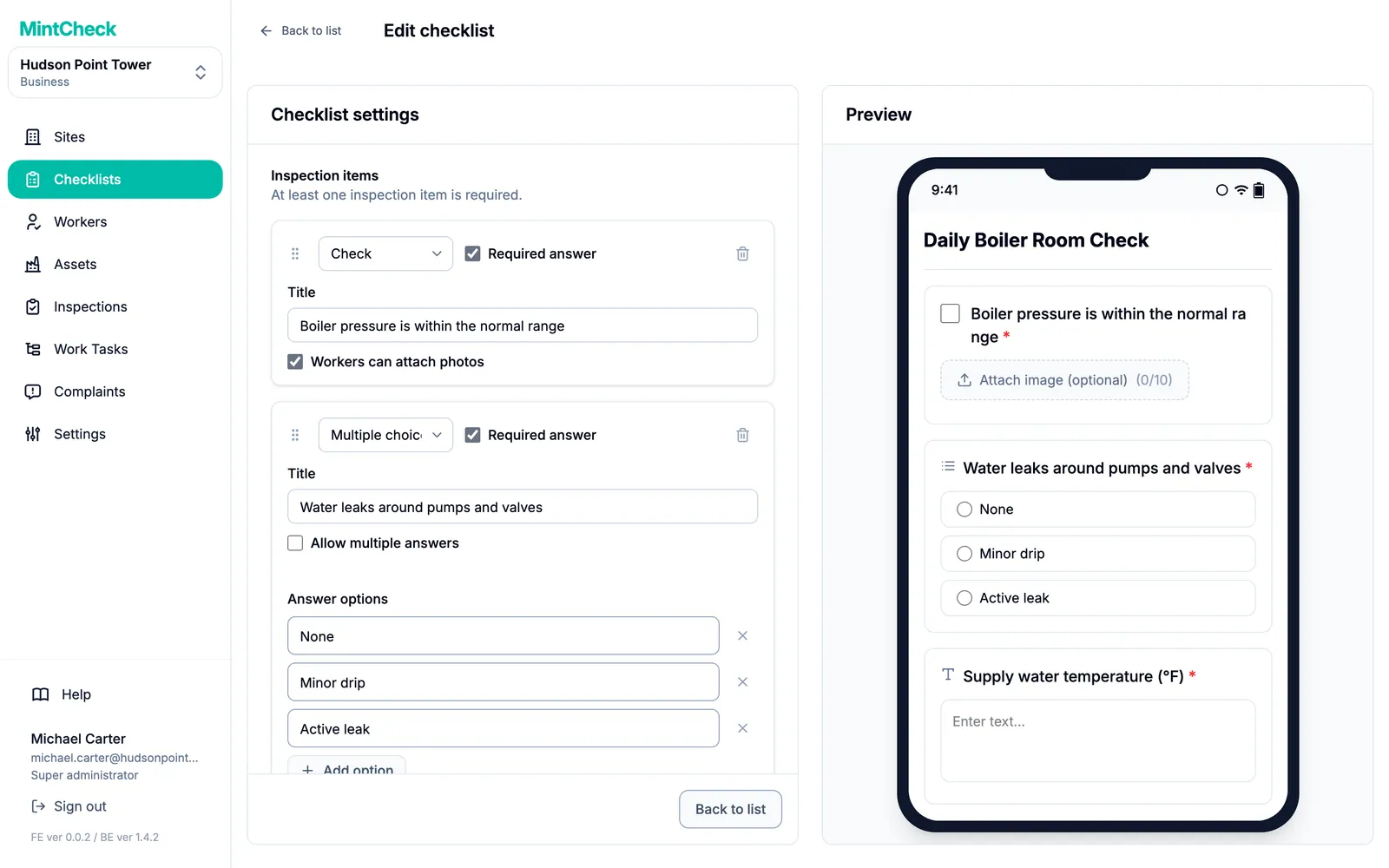
Each inspection also saves the worker, the time and an overall Normal or Abnormal result, so you don't need items for those.
MintCheck is free for up to 5 assets with no credit card. See Checklists in MintCheck, or follow the Quick start.
Common questions
What should an inspection checklist include?
What was checked, when and by whom, a short list of items with clear answers, an overall result, and space for problem details and photos. It should also be clear who is told about a problem and who confirms the fix.
How many items should an inspection checklist have?
There is no fixed number. Use few enough that people do each one properly. MintCheck's templates have four items each as a starting point, and a list that keeps growing can be split.
Should every item need a photo?
No. Ask for photos where they prove something or explain a problem, such as a damaged part. In MintCheck, you can make a photo item required, let workers attach photos to any item, and attach photos when reporting an Abnormal result.
What is the difference between a checklist and a log?
A checklist runs on a schedule, such as once a month, so a missed one can be noticed. A log has no schedule. You write an entry whenever something happens, such as a visitor arriving or a key being handed out. See Logbooks.
Who should write the checklist?
The person responsible for the equipment or space, together with someone who does the check. The first knows what matters, and the second knows what can really be checked on the spot.
Related features
- ChecklistsBuild inspection checklists from ready-made templates, with check, multiple choice, text and photo items, and schedule them daily, weekly, monthly or yearly.
- LogbooksReplace paper logbooks. Workers or visitors scan a QR code to add an entry anytime: entry and exit, vehicle, key, temperature or patrol logs.