Restroom cleaning checklist
This is a daily check for one restroom: are the floor and sinks clean, how does it smell, and are paper and soap stocked? Print the checklist below, or use the same template on a phone in MintCheck.
Restroom sanitation check
DailyCleanliness and hygiene of restrooms
- Site and location
- Date
- Checked by
| Item | Result |
|---|---|
| Floor and sink cleanliness | |
| Odor level | GoodFairPoor |
| Supplies stocked (paper, soap) | |
| Notes | |
| Overall result | NormalAbnormal |
Template from MintCheck · mintcheck.today
How to do each check
Floor and sink cleanliness
The floor is dry and free of litter, and sinks are clean with no standing water. Tick the box only if both are fine.
Odor level
- Good: no noticeable smell.
- Fair: a faint smell that clears with ventilation.
- Poor: a strong smell. Clean the room and check the ventilation and drains.
Supplies stocked
Toilet paper and soap are stocked. Refill anything that is low before you leave.
Notes
Write down anything that needs repair, such as a leak, a blocked drain, a broken lock or an empty dispenser that can't be refilled.
How often to check
This template is set to daily. Busy restrooms need more than that, so choose times that match how the room is used, such as morning and evening. If your site has hygiene rules of its own, such as in food businesses or healthcare, check what they require.
Checklist or cleaning log?
They answer different questions, and you can use both.
| Restroom check | Cleaning log | |
|---|---|---|
| What it shows | The condition of the room at set times | That cleaning was done, by whom and when |
| When it is filled in | On a schedule | Each time someone cleans |
| Typical use | A supervisor or worker checking | A cleaner signing off |
When visitors notice first
People using the restroom often see a problem before your staff do. A complaint QR code on the wall lets them report it from a phone, with a description and photos, without an account or app.
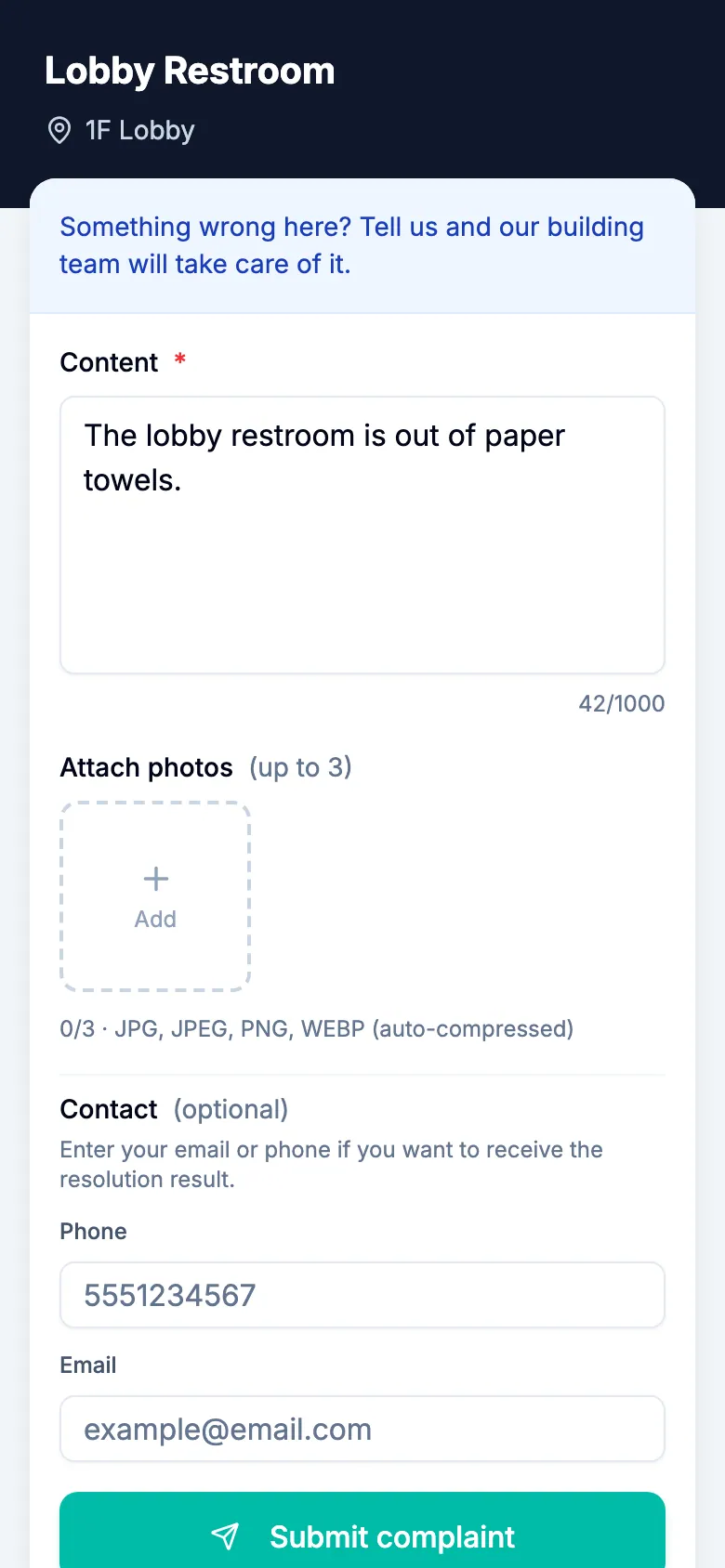
Keep the complaint QR code apart from the QR code your workers use, so visitors only see the one meant for them.
Use this checklist in MintCheck
- In Checklists, click Add checklist and pick the restroom template. Its items and daily schedule are filled in. To check twice a day, add times such as 9:00 and 18:00. Each time is a separate inspection.
- In Assets, click Add asset, pick the restroom template and link the checklist.
- Click Print QR and stick the label near the door.
- Workers scan the label, answer the items and mark the result Normal or Abnormal. They can attach photos.
- For a record of each cleaning, also link the Cleaning log template, which has no fixed schedule. If your cleaners are not registered workers, turn on the public logbook QR so that they can write entries without signing in.
- To take reports from visitors, turn on the complaint box for the asset and put up its complaint QR code.
MintCheck is free for up to 5 assets with no credit card, so you can start with a few restrooms.
Common questions
How often should a restroom be checked?
This template uses a daily check. Busy restrooms need more, so set the times around how the room is used. Some sites, such as food businesses or healthcare facilities, may have their own rules, so check those as well.
What is the difference between this checklist and a cleaning log?
This checklist records the condition of the restroom at set times. A cleaning log records each cleaning when it happens. In MintCheck, the restroom template is a scheduled checklist and the cleaning log is a logbook with no fixed schedule.
Can visitors report a problem without an app?
Yes. In MintCheck, visitors scan the complaint QR code, describe the problem and attach up to 3 photos, with no account or app. The complaint appears in MintCheck for the administrators of that site.
Can we add items to this checklist?
Yes. On paper, write them in. In MintCheck, you can change everything the template fills in, and add check, multiple choice, text and photo items.
Does this checklist meet hygiene regulations?
It is a starting point, not a statement of compliance. Compare it with the rules that apply to your site and add the items they ask for.
Related features
- ChecklistsBuild inspection checklists from ready-made templates, with check, multiple choice, text and photo items, and schedule them daily, weekly, monthly or yearly.
- LogbooksReplace paper logbooks. Workers or visitors scan a QR code to add an entry anytime: entry and exit, vehicle, key, temperature or patrol logs.
- QR complaint boxVisitors scan a complaint QR code to report a problem with photos, with no account or app. You get an email and follow each complaint from received to resolved.