What is QR code inspection?
QR code inspection is a way of running routine facility checks with a QR code on each thing you check. A person scans the code with a phone, the checklist for that item opens, and the answers are saved with the time and the person's name.
It replaces the form on a clipboard and the spreadsheet filled in later. The questions on the checklist can stay much the same. What changes is how the checklist reaches the person and where the answers end up.
How it works
- Each item gets a code. A pump, a fire extinguisher, a restroom or a vehicle gets its own QR code, stuck on it or right next to it.
- A checklist is linked to the code. It sets what to look at and how often, such as every morning or once a month.
- A person scans and answers on a phone. Any phone camera can read the code, so the right checklist opens without anyone searching for a form.
- The result is saved as a record. Each record holds the item, the time, the person, the answers and any photos.
- Someone reviews the records. They can see which checks were missed and which items have problems, without collecting paper first.
Why teams move to QR codes
- The right checklist for the right item. The code belongs to one item, so nobody fills in the wrong form or writes down the wrong room.
- Records you can search. Finding last March's check of one pump takes a search, not an afternoon with a binder.
- Missed checks show up. When a schedule is set, a check that wasn't done is visible that day. On paper, you may not find out until the end of the month.
- Problems stay visible. A problem reported with a photo can stay open until someone confirms it is fixed.
- Several sites in one view. A manager can compare sites without waiting for forms to arrive.
What you need
- A phone for each person doing checks. Any phone with a camera can read the code.
- Labels that last. Ordinary labels are fine indoors. Outdoors or in wet areas, use waterproof label paper or a laminated sheet.
- A short checklist for each kind of item. Ask only what someone will act on.
- A place for the records to go. A QR code can open a plain online form, which is a cheap way to try the idea. A form won't show which checks were missed or follow a problem until it is fixed, so you would have to do that part yourself.
QR codes and inspection rules
A QR code doesn't decide what has to be checked. How often equipment must be inspected, and what must be recorded, depends on the rules where you are. A digital tool changes how you record a check, not what the rules ask for.
QR codes or NFC tags?
NFC tags do a similar job: a phone held against the tag opens the checklist. But you have to buy the tags, and every phone has to be able to read them. QR codes can be printed on an ordinary printer and read by any phone camera, so they are quicker and cheaper to roll out.
Common mistakes
- Labels nobody can scan. Put them at chest height, on or right next to the item, and avoid curved, dirty or very shiny surfaces.
- Checklists that are too long. Long lists get rushed. Keep the questions that lead to action.
- Nobody reads the results. Scanning is only half the job. Decide who reviews the records and how often.
- Starting everywhere at once. Start with one checklist at one site, fix what doesn't work, then expand. How to replace paper inspection logs walks through it.
- Not testing the label. After you stick a label, scan it once to make sure it opens the right item.
How MintCheck does it
MintCheck is a QR inspection service built on this approach. Everything you look after is an asset with its own QR code, and you can print the labels in one go on A4, A5 or Letter paper.
Workers scan with the MintCheck app for iPhone, iPad and Android, or with the phone camera before they install it. They sign in with a login ID or phone number, with no password. They answer each item, mark the result Normal or Abnormal, and can attach photos.
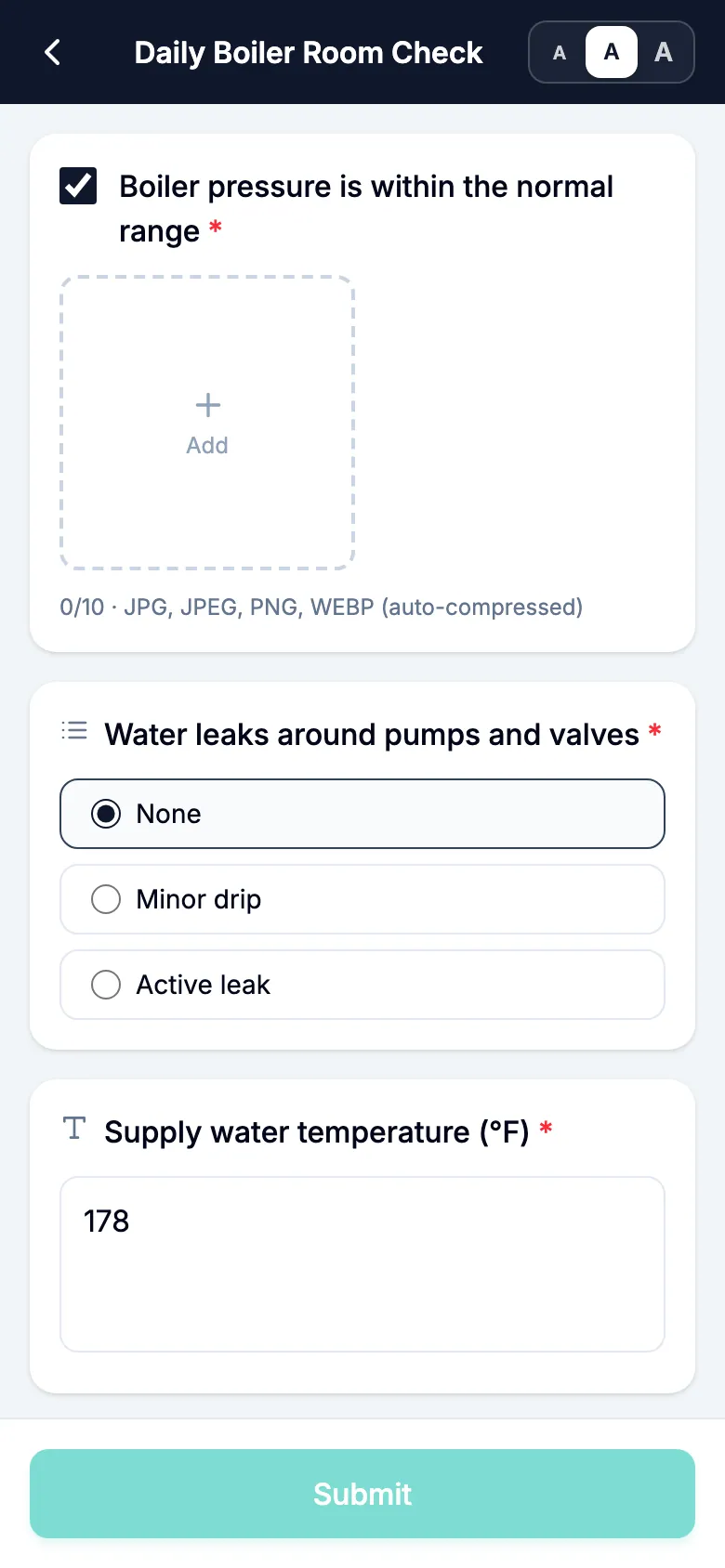
An Abnormal result stays Unresolved until a re-inspection or the next regular inspection comes back Normal, or an administrator resolves it with a note. The site dashboard shows completed inspections against the planned number, and records can be exported to Excel.
Visitors have their own way in: they scan a separate complaint QR code to report a problem, with no account or app.
It is free for up to 5 assets with no credit card. See QR inspections in MintCheck, or follow the quick start.
Common questions
Do workers need a special app to scan a QR code?
Any phone camera can read a QR code. What opens next depends on the tool. In MintCheck, workers use the MintCheck app, and before they install it they can scan with the phone camera and work in the phone browser.
What happens when an inspection finds a problem?
In MintCheck, the worker marks the result Abnormal, describes the problem and can attach photos. It stays Unresolved until a re-inspection or the next regular inspection comes back Normal, or an administrator resolves it with a note.
Do visitors and workers use one QR code?
In MintCheck, no. The QR code on an asset is for registered workers and asks them to sign in. Visitors scan a separate complaint QR code, which opens only a form for reporting a problem.
Are QR inspection records accepted by inspectors and authorities?
That depends on the rule and the authority, so ask the body that applies to your building. Digital records keep the time, the name and the answers, but a tool can't decide whether they satisfy a specific requirement.
How much does QR inspection software cost?
It varies by product. MintCheck is free for up to 5 assets with no credit card. Pay as you go is $0.99 per asset per month up to 30 assets, Business is $199 per month and Master is $299 per month. See pricing.
Related features
- QR inspectionsPut a QR code on each asset. Workers scan it with the MintCheck app to run the checklist due today, with the time, name and photos saved automatically.
- ChecklistsBuild inspection checklists from ready-made templates, with check, multiple choice, text and photo items, and schedule them daily, weekly, monthly or yearly.
- Site dashboardSee today's completion rate, unresolved issues, open tasks and complaints for each site on one screen, refreshed automatically.