QR inspection apps vs paper checklists and spreadsheets
Paper checklists are cheap to start, but hard to search, total or follow up. Spreadsheets add searching and totals, but someone has to type everything in, often later. A QR inspection app records each check as it is done, with the name, the time and photos, shows which checks were missed and keeps problems open until they are fixed.
Here is how they compare.
At a glance
| Paper checklist | Spreadsheet | QR inspection app | |
|---|---|---|---|
| Cost to start | Printing | Often already paid for | A subscription, sometimes with a free tier |
| What you need on site | A pen and the form | A computer, or paper to type up later | A phone |
| Who did it, and when | Whatever was written by hand | Whatever was typed, often later | Saved with the signed-in name and the time |
| Photos | Kept separately, if at all | Possible, but awkward | Attached to the record |
| Missed checks | Found when someone goes through the forms | Found if the sheet is up to date | Shown against the schedule |
| Problems | Depend on someone passing them on | A status column someone must update | Stay open until confirmed fixed |
| Finding old records | Going through binders | A search, if it was typed in | A search by item, person or date |
| Several sites | Forms collected from each site | One file per site, or one very large file | All sites in one place |
| Changing a checklist | Reprint and replace it everywhere | Edit the file and share the new version | Change it once, for future checks |
Where paper checklists fall short
Paper is easy to start with. It gets harder when:
- Several people or shifts fill in the forms, and nobody sees the results until the forms are collected.
- A missed check is only noticed when someone goes through the binder.
- A problem written on a form depends on someone passing it on.
- A checklist changes, and every copy has to be reprinted and replaced.
Where spreadsheets fall short
A spreadsheet is good for totals and simple trends. Its weak points are the typing and the copies. Results get entered later, from memory or from paper, and two people can end up with different versions of the file. A spreadsheet also can't tell you that a check is overdue unless someone has entered everything.
When a QR inspection app helps most
An app pays off when:
- Several people or shifts do the checks, or you have more than one site.
- A missed check has real consequences, and you want to know about it the same day.
- You need names, times and photos without chasing anyone for them.
- Problems get lost between the person who finds them and the person who fixes them.
- Someone spends hours retyping forms.
Can you mix them?
Yes. You can move the frequent checks to an app and keep paper for rare ones. If your reports live in a spreadsheet, an app that exports to Excel lets you keep them there. How to replace paper inspection logs shows how to move one form at a time.
Where MintCheck fits
MintCheck is a QR inspection service for teams that have outgrown paper and spreadsheets. It is free for up to 5 assets with no credit card, and there is no per-user pricing. Workers scan with the MintCheck app, the site dashboard shows completed inspections against the planned number, and records can be exported to Excel. It is available in 37 languages.
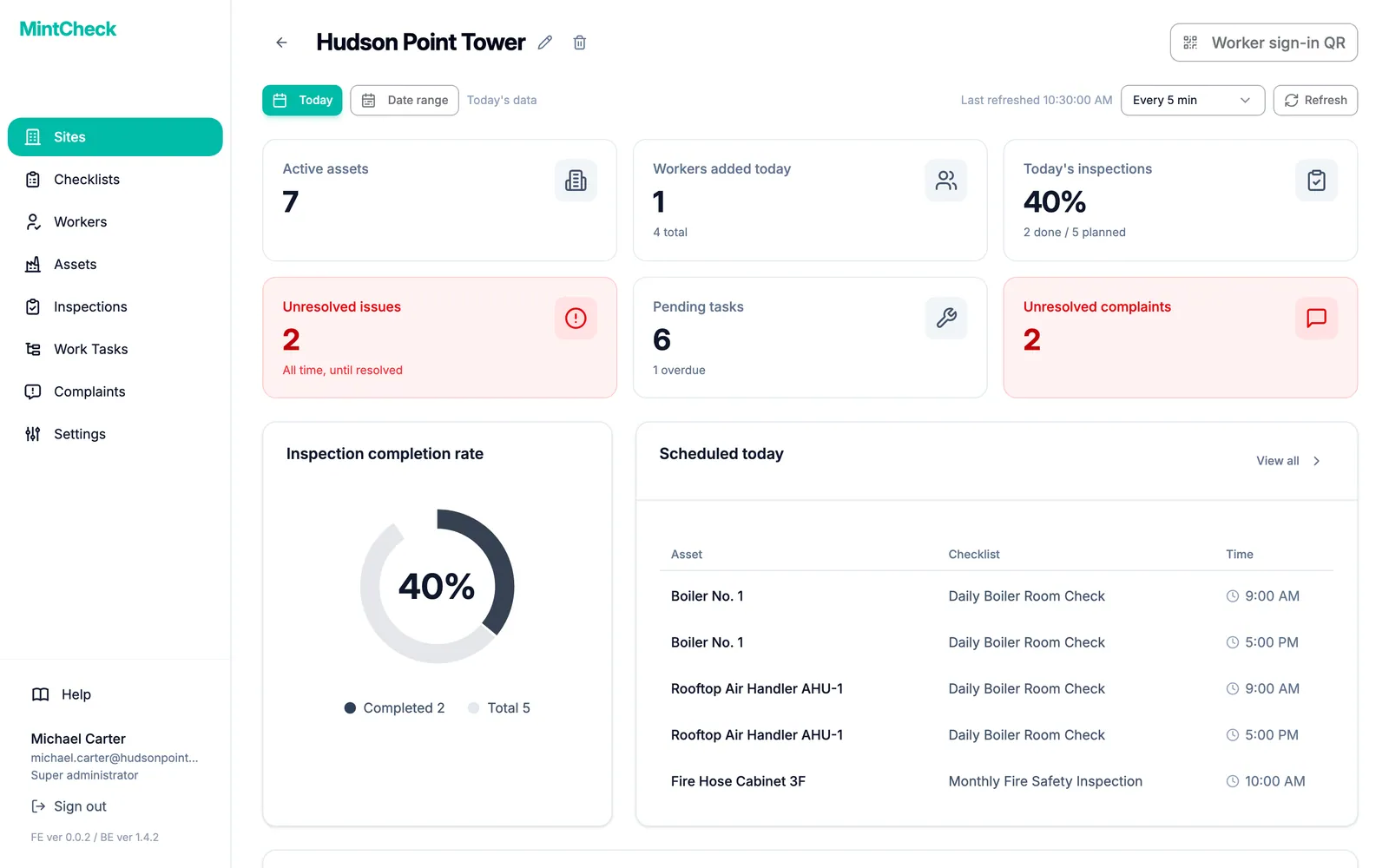
You can walk through the real screens in the interactive demo, or compare plans and pricing.
Common questions
Is a QR inspection app better than Excel?
They do different jobs. An app records names, times and photos as the work is done and shows missed checks without anyone typing them in. Excel is good for reports and totals, and MintCheck can export inspection records to Excel for that.
Can I keep using Excel with a QR inspection app?
Yes, if the app exports your data. In MintCheck, inspection records and work tasks can be exported to Excel.
How do I move from paper to an app?
Move one form at a time: rewrite it as a short checklist, run it at one site for two to four weeks, then stop printing it. See How to replace paper inspection logs.
Are paper records still acceptable?
That depends on the rules that apply to your building and on the authority that checks them, so ask them.
How much does a QR inspection app cost compared with paper?
Paper costs printing and the time spent collecting and retyping forms. MintCheck is free for up to 5 assets with no credit card. Pay as you go is $0.99 per asset per month up to 30 assets, Business is $199 per month and Master is $299 per month.
Related features
- QR inspectionsPut a QR code on each asset. Workers scan it with the MintCheck app to run the checklist due today, with the time, name and photos saved automatically.
- Site dashboardSee today's completion rate, unresolved issues, open tasks and complaints for each site on one screen, refreshed automatically.
- Work tasksCreate one-off jobs such as repairs, assign them to an asset, a worker or a work tag, and track them until done. Workers are notified in the MintCheck app.